Showing posts with label huawei. Show all posts

Thursday, October 27, 2011

HUAWAEI LAUNCHES DUAL SIM ANDROID PHONES IN NIGERIA

By Prince Osuagwu

Nigeria’s burgeoning mobile sector attracted yet another additional investor last week as Huawei Technologies Ltd, announced the introduction of series of mobile devices into the highly competitive Nigerian mobile phone market.

Huawei is regarded as one of the world’s biggest telecom service providers. It is also one of the prominent telecom Infrastructure providers for many telecom operators in Nigeria, playing in the B2B genre of the technology business for many years.

But now the company says its market survey has discovered a Nigeria with rich, untapped mobile market, begging to be explored.

As a way of grabbing its own share of the pie, the company rolled out an array of seven Qwerty plus touch android based smart phones hoping that they would delight Nigerians.

The flagship of the Android phones is the U8520, which is a dual sim smart phone that supports voice in one SIM and data on the other SIM. Unlike other dual-SIM smartphones the Huawei model has one SIM card slot that can work with 3G network, and the other slot compatible with the GSM network.

The new phone have varied features and styles targeted to meet individual needs ranging from full business (Smart phones) phones to full social networking, emails and internet browsing.

Boasting of high pixels, touch screens, hot spot/WiFi connectivity and sleek designs, the phones also run on the Android operating system which is the fastest growing operating system and targets young social networkers and those who have the youthful mind set.

Other models include the G1000+, G6150, G6005, U8650 and the Boulder U8350 smart phone as well as the S7 Slim Tablet. Though these are application-based high end level phones, Huawei promised that they were going to be affordable for the Nigerian customers.

Unveiling the series in Lagos the company’s Managing Director, Terminals, Mr Jacky Lee, promised that in the coming months, Nigerians from all business strata, social and economic status would have a phone that would help them bridge the digital divide without putting a hole in their pockets.

SOURCE: Vanguard

Wednesday, October 26, 2011

HOW TO UNLOCK HUAWEI AND ZTE MODEMS FOR FREE

Most of people trying to unlock their HSDPA modem,because some modem s works for just 1 network.after unlock you can use any networks. It takes just few seconds to unlock your modem, when we put some other network sim card it will ask some code. So i'm going to generate that code. First of all you have to find your IMEI of mode, it will mention on your modem or modem box its 15 digit, now follow this step to find your IMEI number:

STEPS TO UNLOCK HUAWEI HSPDA MODEM

  • Paste this below address to your address bar: http://bb5.at/huawei.php?imei= your Huawei modem IMEI number,
  • Now replace your Huawei modem IMEI number with your IMEI number like below
    http://bb5.at/huawei.php?imei=357133035912053, then press your enter key, or click to load the page.
  • After the page loads, you will see something like this

    UNLOCK HUAWEI CODE OUTPUT
  • Now enter this unlock code when it ask the code, then you are done.

STEPS TO UNLOCK ZTE HSDPA MODEM

Some ZTE modems are not asking for unlock code, so we have no where to input our code, so you can't do it like the above method, you have to use some software for this.
Download software here.

  • First of all, if you use memory card, remove it. Insert the sim card you want to use in the to unlock,(it will display invalid sim).
  • Plug your modem in to your computer, sometime connection manager will display(close it).
  • Unzip what you downloaded and open/run dccrap.exe
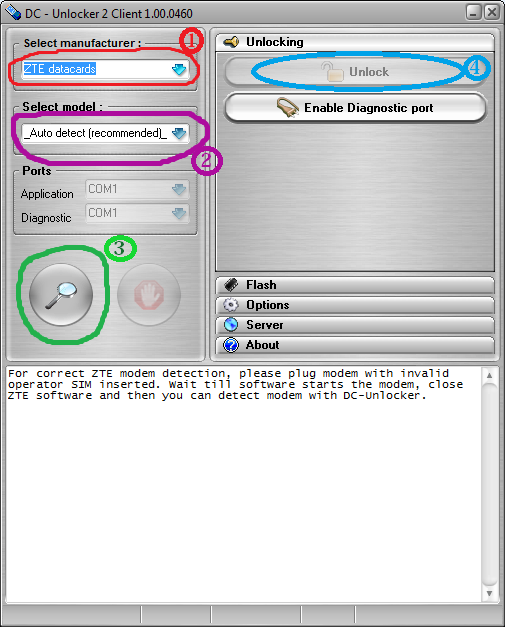
  • DCCRAP SCREENSHOT AFTER INSTALLATION
  • First select the manufacture as ZTE datacards ( No: 1)
  • Select the model as Auto detect (recommended)(No : 2 ), If you know the model and which com port you use.u can do that way also
  • Click find button (No: 3), after your modem model will display below box
  • After it has detected modem, click unlock button (No: 4 ) to unlock

Cheers you are done. After few seconds modem will unlock restart your computer and use
your modem. This connection manager also working for this, but if you want to use ZTE connection manager click below link to download.

Download ZTE connection manager here