Showing posts with label zte. Show all posts

Friday, November 25, 2011

ZTE CHORUS (ZTE D930) REVIEWS

ZTE CHORUS IMAGE The ZTE Chorus is an entry level music centric Android available from Cricket. The Device sports a 3.2-inch resistive touch WQVGA display, 2-megapixel camera, multimedia players, GPS, organizer and 3G connectivity.

ZTE CHORUS SPECIFICATION

DESIGN
  • Design type: Smart Phone
  • OS: Android
  • Form Factor: Candybar
  • Dimensions: 4.40 x 2.20 x 0.60 (112 x 56 x 15 mm)
  • Weight: 3.70 oz (105 g)
TECHNOLOGY
  • CDMA: 800, 1700/2100, 1900 MHz
  • DATA: EV-DO
  • SATELLITE SYSTEM: GPS, E911
PHONE FEATURES
  • PHONEBOOK: Caller groups, Multiple numbers per contact, Search by both first and last name, Picture ID, Ring ID
  • ORGANIZER: Calendar, Alarm, Calculator
  • MESSAGING: SMS, MMS, Predictive text input (XT9)
  • EMAIL: IMAP, POP3, SMTP, Push e-mail
DISPLAY
  • PHYSICAL SIZE: 3.20 inches
  • RESOLUTION: 240 x 400 pixels
  • TECHNOLOGY: TFT
  • COLORS: 262 144
  • TOUCHSCREEN: Resistive
CONNECTIVITY
  • BLUETOOTH: Yes
  • USB: USB 2.0
  • CONNECTOR: microUSB
  • FEATURES: Mass storage device
BATTERY
  • TALK TIME: 4.16 hours
  • STAND-BY TIME: 20 hours
  • CAPACITY: 1000 mAh
HARDWARE
  • PROCESSOR TYPE: Single core, 600 MHz
  • STORAGE SLOT TYPE: microSD, microSDHC
  • MAXIMUM CARD SIZE: 32 GB
CAMERA
  • CAMERA FEATURES: 2 megapixels, Digital Zoom
  • CAMCORDER: 320x240 (QVGA) (15 fps)
MULTIMEDIA
  • SPEAKERS: Earpiece, Stereo speakers
INTERNET BROWSING
  • BROWSER: Yes
  • SUPPORT: HTML
OTHER FEATURES
  • NOTIFICATIONS: Music ringtones (MP3), Polyphonic ringtones, Vibration, Silent mode, Speakerphone
  • SENSORS: Accelerometer
  • HEARING AID COMPATIBILITY: M4, T3
AVAILABILITY
  • OFFICIALLY ANNOUNCED: 23 Nov 2011
SHOPPING INFORMATION
  • ACCESSORIES: ZTE Chorus Phone, Li-ion Battery, 4 GB SanDisk® Muve capable Memory Card, Travel Charger, Quick Start Guide, Enhancement Guide, Quick Reference Manual, Muve Music User Guide

To see the full specs click here

Thursday, October 27, 2011

HOW TO UNLOCK ZTE MF-627/628 USB MODEM FOR FREE

After I posted about how to unlock Huawei USB modems, many people have emailed, tweeted and contacted me asking if the Huawei unlocker tool would also work for ZTE USB modems. Of course, the answer is no.
Since ZTE MF-627 and MF-628 broadband modem dongle are commonly provided upon subscribing to an internet connection in one of the leading wireless 3G internet providers in our country, the demand for unlocking these particular modem models is also common.

The software below lets you unlock ZTE USB modems for free. It basically involves re-flashing the modem – which, although it may sound scary, is actually straightforward and easy if the instructions are properly followed. This simple software reflash can only work in Windows XP and the whole process takes around 20-25 miniutes.

Tested working by myself twice already with a MF-627 dongle and a MF-628.

Just download the file from here. It includes the firmware installer/flasher and the instructions in both PDF and DOC versions. Please note that flashing or updating the firmware involves some risk particularly if you don’t follow the instructions properly. It could break your modem dongle and may become unusable! So it is really important to read and understand the instructions carefully and follow them. The software specifically mentions Windows Vista as having potential problems.

After you have unlocked the modem, remember that you have to make few changes in your connection settings each time you change your network provider. You can readily find the proper settings for these providers using Google searches.

Wednesday, October 26, 2011

HOW TO UNLOCK HUAWEI AND ZTE MODEMS FOR FREE

Most of people trying to unlock their HSDPA modem,because some modem s works for just 1 network.after unlock you can use any networks. It takes just few seconds to unlock your modem, when we put some other network sim card it will ask some code. So i'm going to generate that code. First of all you have to find your IMEI of mode, it will mention on your modem or modem box its 15 digit, now follow this step to find your IMEI number:

STEPS TO UNLOCK HUAWEI HSPDA MODEM

  • Paste this below address to your address bar: http://bb5.at/huawei.php?imei= your Huawei modem IMEI number,
  • Now replace your Huawei modem IMEI number with your IMEI number like below
    http://bb5.at/huawei.php?imei=357133035912053, then press your enter key, or click to load the page.
  • After the page loads, you will see something like this

    UNLOCK HUAWEI CODE OUTPUT
  • Now enter this unlock code when it ask the code, then you are done.

STEPS TO UNLOCK ZTE HSDPA MODEM

Some ZTE modems are not asking for unlock code, so we have no where to input our code, so you can't do it like the above method, you have to use some software for this.
Download software here.

  • First of all, if you use memory card, remove it. Insert the sim card you want to use in the to unlock,(it will display invalid sim).
  • Plug your modem in to your computer, sometime connection manager will display(close it).
  • Unzip what you downloaded and open/run dccrap.exe
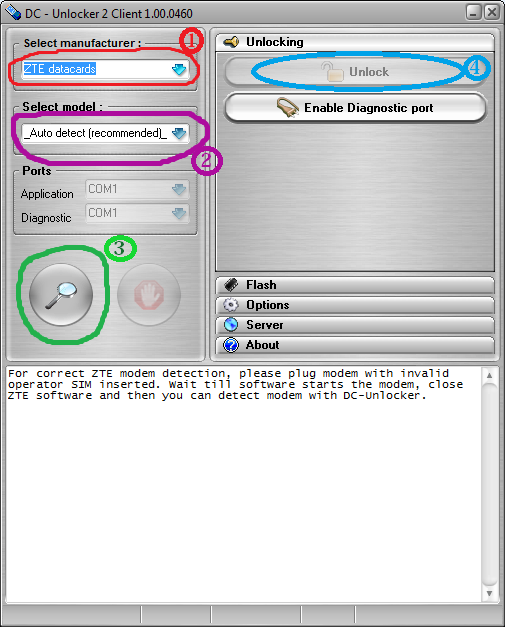
  • DCCRAP SCREENSHOT AFTER INSTALLATION
  • First select the manufacture as ZTE datacards ( No: 1)
  • Select the model as Auto detect (recommended)(No : 2 ), If you know the model and which com port you use.u can do that way also
  • Click find button (No: 3), after your modem model will display below box
  • After it has detected modem, click unlock button (No: 4 ) to unlock

Cheers you are done. After few seconds modem will unlock restart your computer and use
your modem. This connection manager also working for this, but if you want to use ZTE connection manager click below link to download.

Download ZTE connection manager here